October 28, 2019

How To Add A Horizontal Line between Each Post in Blogger

add horizontal line between the posts in blogger

Adding a post separator or divider line is very easy task in blogger. You can add a Horizontal Line between Each Post in Blogger with following three ways.

First Method

1. Go to Blogger >>Theme >> Edit HTML

2. Click anywhere in the HTML codes and Press Ctrl+F 

3. Now search for .post code line

4. Add the following code below the .post

border-bottom:1px groove #b4b4b4;

5. Save the Theme and check the blog

How To Add Each Blogger Post in Separate Boxes

To Add Each Blogger Post in Separate Boxex , you can do it very easily. You will have to perform following steps  and by doing these steps each blog post will show up in seprate box on homepage of your blog.

1. Go to Blogger  >> Theme  >> Edit HTML

2. Click anywhere in the HTML codes and Press Ctrl+F

3. Now search for ]]> </b:skin> code line

4. Add the following code above the ]]> </b:skin>

.post {
background:#FFFFFF;
border: 1px solid #000000;
padding-right:7px;
padding-left:7px;
padding-top:7px;
padding-bottom:7px;}
.post:hover {
border: 1px solid #FF0000;
}
.post:active {
border: 1px solid #0004FF;
}

Remove Links from Header and Post Title in Blogger

Follow These Steps To Remove Header Link

1. Go to Blogger >>Theme >> Edit HTML

2. Click anywhere in the HTML codes and Press Ctrl+F   

3. Now search for below  code of lines

Change Post Title Font, Size and Color in Blogger

1. First Login in your blogger Account & Select Your Blog.
2. Go to Blogger  >> Theme  >> Edit HTML
3. Remove Code Like Below......

.post-title, .post h3{
Code of Lines....
...........................
}
.post h3 a, .post h3 a:visited, .post h3 strong {
Code of Lines.....
...........................
}
.post h3 strong, .post h3 a:hover {
Code of Lines.....
...........................
}

October 27, 2019

Top 18 Secrets to boost your Blogger blog speed Super Fast


Follow These Top 18 Secret Steps to boost your Blogger blog speed Super Fast

1. Remove default Widgets, JavaScript from Blogger

2. Remove the unwanted default CSS files

(a) Search For the tags:
<b:skin><![CDATA[
Code of Lines...........
...................................
]]></b:skin>

(b). Now Cut All your CSS codes' and paste that code inside Style Like below

<style type='text/css'>
Code of Lines...........
...................................
</style>

(c). And now place that code in your template as:
<b:skin><![CDATA[
]]></b:skin>

<style type='text/css'>
Code of Lines...........
...................................
</style>

May 08, 2017

Search Preference Setting in blogger

Enable Search Preference Setting:

Steps to enable search preference setting in your blogger account.

1. Go at blogger.com and Log in your blogger acccount.

2. Select Blog a blog in which you want to enable your search preference setting. 

3. Now Click on Setting > Search Preference

in Search Preference you will see following Options 

  1. Meta tags
  2. Errors and redirections
  3. Crawlers and indexing
  4. Monetisation

May 07, 2017

Basic Blogger Settings

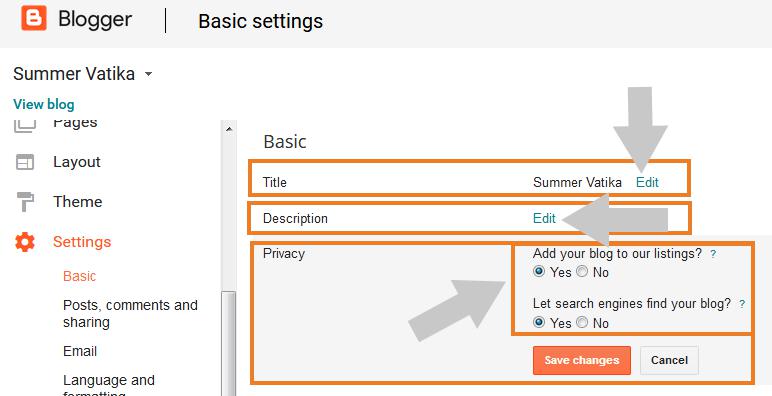
After creating a blog [Read => How to create/start a blog using blogspot Blogger] on blogger you need to do basic blogger setting . If you are a beginner, then this post wiil be very helpful in  configuring basic Blogger settings .

Configuring basic Blogger settings is not a tidious task, Anyone who dont know anything about technology or any web skill can peform this task very easily.


You need to do following 6 basic blogger setting for better SEO.


1. Basic :  Under this setting you can change the title and description of your blog. Write the description of your blog which  will be shown in your blog below blog title.  Next to description setting by default the privacy setting remain yes. These setting is used fr privacy of your blog